
Store guide
Salla Product Ads: Turn Your Salla Store Into Social Ads
To make ads for your Salla products, paste your Salla store link into Lahjty (لهجتي). It reads your public product pages for names, photos, prices and stock, saves each item as a product, and turns any of them into an ad image built on the real product photo, a caption in your customers' Arabic dialect and a voiceover.
Importing is free within your plan's product limit and needs no app on your store.
First 3 ad images freeNo card needed
Written byShadi Al MilhemFounder of Lahjty
Updated
Example ads made from one product photo
SAHRA OUD is a fictional perfume. These pictures came from one photo of the bottle through Sets: a square store photo and two 4:5 social posts. They show the format, not results from customers.
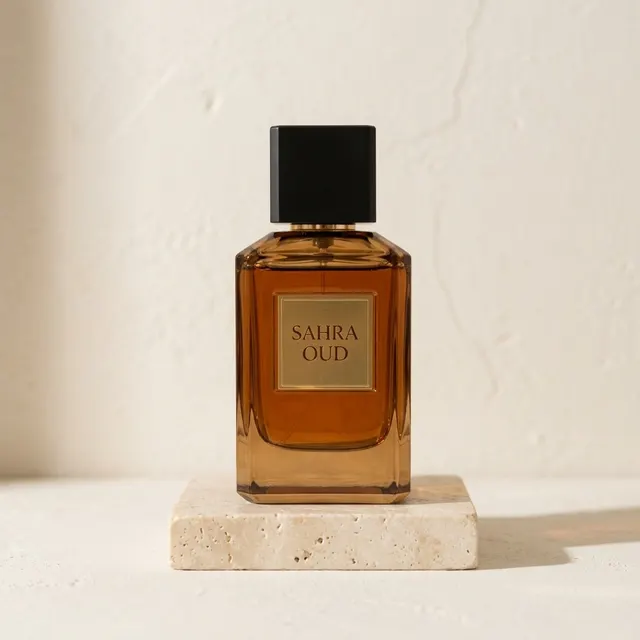
SAHRA OUD
Saudi ArabicStore photo, 1:1Example caption:
عود دافي يليق بمجلسك وضيوفك. SAHRA OUD موجود الحين في المتجر، اطلبه بضغطة.
In English: A warm oud that suits your majlis and your guests. SAHRA OUD is in the store now; order it in one tap.
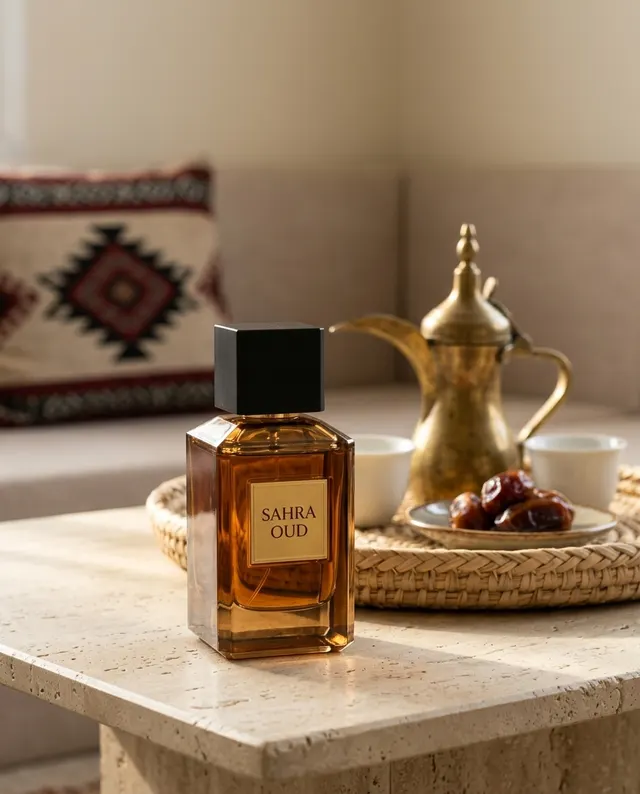
SAHRA OUD
Saudi ArabicSocial post, 4:5Example caption:
وش أحلى من قهوة وتمر وريحة عود؟ SAHRA OUD يكمّل جلستك، اطلبه الحين.
In English: What beats coffee, dates and the scent of oud? SAHRA OUD completes your gathering. Order it now.
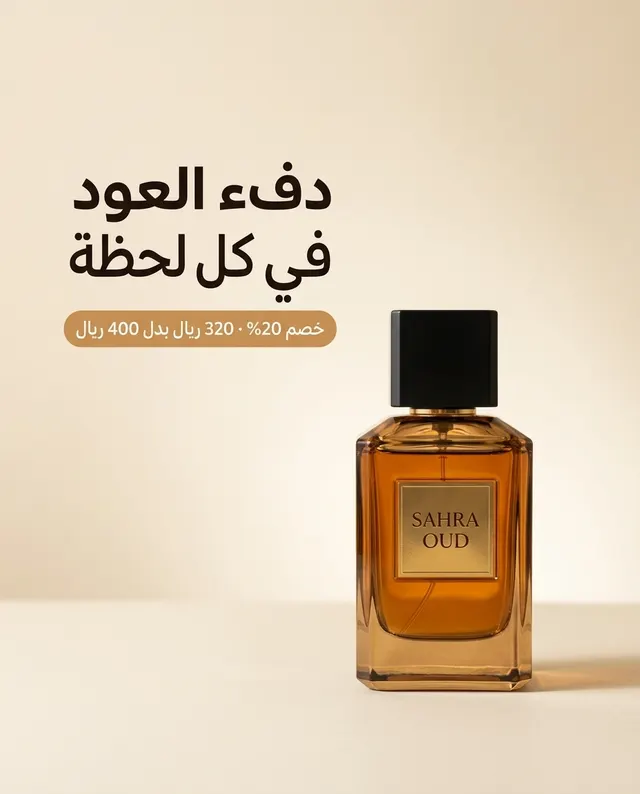
SAHRA OUD
Saudi ArabicSocial post with offer line, 4:5Example caption:
SAHRA OUD الحين بـ320 ريال بدل 400، خصم 20% على عودك المفضل. اطلبه من المتجر.
In English: SAHRA OUD is now 320 riyals instead of 400: 20% off your favourite oud. Order it from the store.
How to turn your Salla store into ads
Paste your Salla store link
Open Products, choose Import and paste your store address, either your own domain or your salla.sa link. Tick the box confirming the store is yours or that you may use its photos and text.
Let the import run
Products appear as they are saved, each with its main photo, price, sale price and stock.
Press Make an ad
The composer opens with the product attached. Pick the size for where you will post, the dialect, and whether the image carries text, or start from a ready ad style in the Ideas sheet.
Add the caption and voiceover
Use Caption for post text in the same dialect, Headline for a short title, and Voiceover when you post Reels or TikTok videos.
Make several at once with Sets
Select products, choose store photos or social posts and an occasion, and Sets makes up to 10 pictures on Lahjty's side. You can close the tab and get an email when they are ready.
What Lahjty reads from your Salla store
Lahjty reads what your public store already shows shoppers: each product's name, description, category, photos, price, the price before a sale and whether it is in stock. It never reads cost prices or anything behind your Salla dashboard, and it does not install an app, upload pictures or change your store.
Each import reads one language. Paste your Arabic store address for Arabic names, or the English one for English names, because the ads keep each product's name exactly as written.
Limits, refreshes and price changes
The free plan saves up to 10 products and runs 3 imports or refreshes a day; Solo saves 150 and Business 1,000. One import reads up to 2,000 products, and anything over your plan's limit is counted but not saved.
Refresh the store later and prices and stock update. Products that left your store are marked as missing instead of being deleted, and an ad made before a price change shows "Price changed since this ad".
Offers, dialects and the Saudi discount licence
Each product can hold one offer: a discount, buy X get Y, a bundle price, a gift, free delivery or a coupon, with an optional last day. When you include it, Lahjty checks every caption and rewrites any that invents a percentage, price, code or deadline your offer does not have. For a Saudi discount, add your licence number and it closes the caption as small print.
Most Salla stores sell in Saudi Arabia, so Saudi Arabic is the natural default. If you also ship to the UAE or Egypt, add a caption in Emirati or Egyptian Arabic.
Check before you post
- The product in the ad matches your photo: shape, colors, label and logo.
- Every word printed on the image is spelled right and reads in the right direction.
- The price and offer in the caption match your Salla product page today.
- A Saudi discount carries your licence number in the caption.
Questions sellers ask
Is Lahjty an official Salla app?
No. Lahjty is not a Salla app and has no partnership with Salla. It reads your store's public product pages from the link you paste, so there is nothing to install and no store permission to grant.
Does importing my Salla products use credits?
No. Importing and refreshing use no AI and no credits. Credits are spent only when you make something: an ad image, a caption, a headline or a voiceover.
Will Lahjty change anything in my Salla store?
No. Lahjty only reads public pages. It does not edit products, change prices or upload pictures to your store. You download the ads and post them where you sell.
What happens if an ad comes out wrong?
Every new ad image is read back before it is saved: the printed text is compared with your words and the product with your photo. If something is still wrong after one redraw, the image is not saved and its credits return to your balance.
Do ads on the free plan carry a watermark?
Yes. Images made on the free plan carry a small Lahjty mark. Any credit pack or paid plan removes it from the images you make after that.